
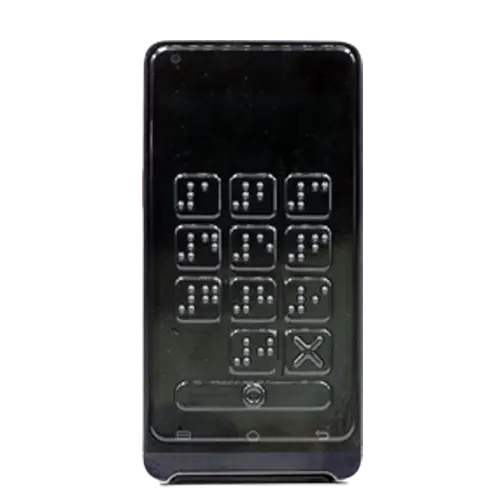
Duratis Braille Overlays enable accessible PIN entry on touchscreen payment terminals: blind and visually impaired customers can enter their PIN independently, even on terminals with no physical keypad. Raised Braille markings placed precisely over the virtual PIN pad buttons let the user find and press the right digit with confidence.
They are used wherever a cashier or salesperson serves customers at a touchscreen payment terminal – in retail, hospitality, pharmacies, service points and many other businesses.
When a blind or visually impaired customer is paying, the cashier places the overlay on the terminal screen for the time of PIN entry and removes it right after the transaction. Putting it on takes just a few seconds. The customer first feels the Braille marking and only then presses the button deliberately.

The layout of the virtual PIN pad depends not only on the terminal model, but also on its software – the same device can show different button layouts depending on the software running on it. That is why each Duratis Braille Overlay – a tactile PIN pad overlay – is designed for a specific device and its PIN pad layout, so the markings sit exactly over the virtual buttons.
We capture the button layout directly from the PIN pad, as even the same model may have different key arrangements.
We design the overlay for your device and its PIN pad layout.
We prepare a few samples for evaluation.
You review and approve the design and samples.
We prepare the final tool for series production.
Overlays are automatically cut, quality-checked and shipped to you.
To start, we need a 1:1 screenshot of the virtual PIN pad or access to the device with the PIN pad displayed. A screenshot lets us start designing right away.
Braille Overlays are thermoformed, so no injection moulds are needed and production time is shorter. Contactar-nos to discuss your project.
The cashier places the overlay on the terminal screen for PIN entry and removes it right after the transaction. It takes just a few seconds.
Silicone overlays can trigger a virtual button as soon as they are touched and are more expensive. With a Duratis Braille Overlay, the user first feels the marking and only then presses the button deliberately. It is also suitable for larger terminal fleets.
Each overlay is designed for a specific terminal model and its PIN pad layout. Overlays are suitable for payment terminals with a touchscreen and no physical keypad.
The same terminal model can display different PIN pad layouts depending on the payment application. The overlay must match the exact layout to work correctly.
A 1:1 screenshot of the virtual PIN pad, or access to the device with the PIN pad displayed.
No. The touchscreen works as usual through the overlay.
The overlay is designed for touchscreen terminals operated by a cashier, who places it on the screen for PIN entry. Terminals with a physical keypad do not need an overlay. If you are looking for a solution for self-service kiosks, contact us to discuss your requirements.
Accessibility requirements for payment terminals are set out in EU regulations, including the European Accessibility Act (EAA). A Braille overlay makes it easier to meet them by enabling independent PIN entry on a touchscreen, without replacing the terminal.
The minimum order quantity (MOQ) for Braille Overlays is 1,000 pieces.
Yes. The overlay is made of recyclable polyethylene (PE).
Choose which cookies we may use. Necessary cookies are always on because the website cannot work without them. You can change your choice at any time.
Required for the website to work, e.g. security, language selection and remembering your cookie choice.
Help us understand how visitors use the website (e.g. Google Analytics) so we can improve it.
Used to measure and personalise our advertising (e.g. Google Ads, LinkedIn).
Remember settings that make the website more convenient for you.
